CASE STUDY / DATA PIPELINE
一開始我以為需求只是「把 CSV 存進資料庫」,後來才發現真正要設計的是:如何讓數量不固定、可能失敗的資料工作,在 Web Request 之外被可靠地完成,而且每一份檔案都能被追蹤。
Jupyter Notebook · pandas · Pydantic · FastAPI · Huey · Redis · diskcache · Prisma Client Python · MySQL · SMT SPI / AOI
說明:本文以製造業 MES 後端專案中的實際程式碼、notebook 與 commit history 為基礎整理。產線、站別、資料表與類別名稱皆已匿名化(例如以 LINE_A、SpiTestService 代稱),程式邏輯保持不變。文中沒有任何效能數字,因為專案裡沒有可支撐的 benchmark。
1. 前言:需求看起來只是「把 CSV 存進資料庫」
SMT 產線上的 SPI(錫膏檢測)與 AOI(自動光學檢測)設備,每檢測一片板子就輸出一份檔案。後端要做的事聽起來很單純:把這些檔案讀進來、存進 MES 資料庫,讓品保與製程工程師可以用條碼追溯每一片板子的檢測結果。
實際做下去,問題很快就不只是 parsing:
- 每家設備的 CSV 都不是「一張表」,而是好幾個區塊拼在一起的報表格式
- 一份檔案展開後是 pad-level 的明細,一次寫入就是一批資料
- 資料要跨越「產線電腦 → API → 資料庫」三個邊界,任何一段都可能失敗
- 新站別持續加入,parsing rule 會一直改
這篇記錄的是這條 pipeline 如何從 notebook 實驗、Client 端解析,演進成「上傳檔案 → Server 解析驗證 → Queue → Worker 寫入 → 狀態查詢」的架構,以及每一步背後的取捨。
2. 從 Notebook 開始:先搞懂資料長什麼樣
我在 repository 裡替每一種設備格式都留了一本日期命名的 notebook(例如 SPI、AOI、OS、效率測試、HIPOT 各一本)。它們的角色不是教學,而是在寫任何 API 之前,先把未知格式的 parsing rule 定下來。
2.1 一份 CSV 其實是三個區塊
以某台 SPI 設備為例,notebook 第一步只是把原始內容印出來看:
生产线名,Line01
机器名称,<machine>
操作员姓名,<operator>
检查程序名,<program>-B
批号,<lot>
MOUNT块编号,0,1,2,3,
条形码,<barcode-1>,<barcode-2>,<barcode-3>,<barcode-4>,
检查焊盘数,1376
Ng数,0
WARN数,1
判定结果,程序块编号,MOUNT块编号,...,NG上限,NG下限,...,NG上限,NG下限,...
OK,0,0,...,  134.6,210,40,...
從這裡可以直接歸納出幾條規則:
- 檔頭是 key-value,但被中間兩行條碼切成兩段(第 1–5 行、第 8–10 行)
- 條碼是橫向排列,一列 mount block 編號、一列條碼,兩者要一一對應
- 明細表從第 11 行開始,而且欄位名稱大量重複(
NG上限出現九次,分別屬於體積、高度、面積……) - 數值帶前導空白(
' 104.8'),-代表沒有值 - 編碼因設備而異:這台是 GBK、簡體中文欄位;另一條線的 SPI 是 UTF-8、英文欄位
- 部分 metadata 只存在檔名裡:
<code>_<YYYYMMDDhhmmss>_<OK|NG|WN|Judge>.csv
2.2 把規則寫成可重用的函式
notebook 裡的 parsing function 是按區塊拆開的,這個結構後來幾乎原封不動搬進正式系統:
def read_spi_header(file_path: str) -> dict:
    # 檔頭是 key-value,但被條碼區塊切成兩段
    df_1_5 = pd.read_csv(file_path, header=None, skiprows=0, nrows=5,
                         usecols=[0, 1], encoding="gbk")
    df_8_10 = pd.read_csv(file_path, header=None, skiprows=7, nrows=3,
                          usecols=[0, 1], encoding="gbk")

    df = pd.concat([df_1_5, df_8_10], ignore_index=True)
    df.fillna("", inplace=True)
    df.columns = ["headers", "data"]
    return df.set_index("headers")["data"].to_dict()


def parse_filename(filename: str):
    pattern = re.compile(r"^(?P<code>.+)_(?P<ts>\d{14})_(?P<judge>OK|NG|WN|Judge)$")
    m = pattern.match(filename)
    return (m["ts"], m["judge"]) if m else None
重複欄位名的問題,pandas 讀取時會自動改成 NG上限、NG上限.1、NG上限.2……所以我用一張 mapping table 把「位置語意」轉成「欄位語意」,例如 NG上限.1 → height_ng_upper。型別轉換則交給 Pydantic:str_strip_whitespace=True 處理前導空白,model_validator(mode="before") 統一把字串轉成 int / float。
2.3 Notebook 裡的實驗演進
幾個從 notebook 看得出來的迭代:
- 讀一次再切片:早期同一份檔案用
skiprows/nrows讀兩三次;後來另一條線的版本改成read_csv讀一次,再用iloc[0:4]、iloc[6:9]切出需要的列。正式程式碼採用後者。 - 編碼偵測:在另一本 FCT 的 notebook 裡試過
chardet偵測編碼,正式程式碼則是依設備寫死編碼(GBK / UTF-8)。 - 一個被吞掉的錯誤:讀條碼的函式包了
try/except回傳(None, None)。notebook 輸出顯示某些檔案確實拿到了(None, None)——這代表 fallback 會把「格式錯誤」和「這片板子沒有條碼」混成同一種結果。這個問題到現在的版本仍然存在,後面會再提。
Notebook 的價值在於: 在碰 API、交易、佇列之前,先用最短的回饋迴圈回答「這份資料的結構是什麼、哪些欄位可信、哪些值要正規化」。
3. 第一版:在 Client 端解析資料
parsing rule 穩定之後,第一個上線的做法是在產線電腦上跑 Python script(repository 裡的 *_csv2db.py):
- 從
config.ini讀取要監看的資料夾 - 逐一掃描 CSV,用 notebook 裡同一套 pandas 函式解析
- 在 Client 端建立 Pydantic model(Server 端也有一份同樣的 model)
- 把結果以 JSON POST 到 API
- 上傳成功就把檔案搬到
uploaded/資料夾
較早的站別(其他產線的 FCT、ICT、鎖螺絲、點膠、效率測試等)都是這個模式。SPI 則拆成了兩個 API:先建立檢測主檔拿回 test_id,再把明細分批送出。(拆分的原因根據目前 repository 推測是明細筆數多——notebook 範例檔的檔頭記錄的檢查焊盤數在一千到兩千多之間,明細是 pad-level 的列。)
spi_response = await upload_data_async(spi_data.model_dump())  # POST /SPI_Test
test_id = spi_response.json().get("id")
if test_id is None:
    logger.info(f"Can not upload file {file_name}")
    continue

await upload_data_items_async(test_id, item_list)   # POST /SPI_Test/{test_id},每批 20 筆
move_uploaded_file(file_path, uploaded_dir)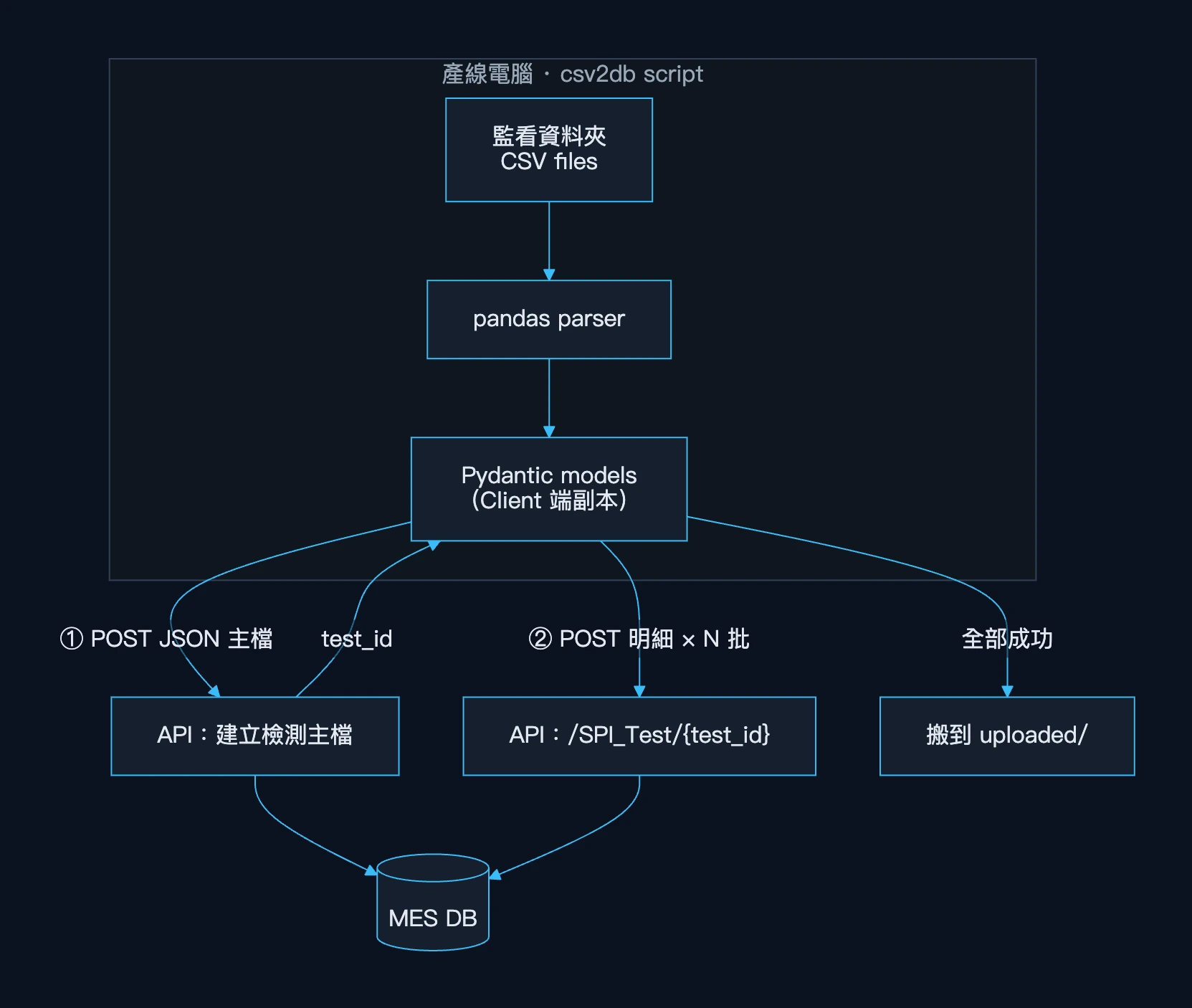
這個版本一開始的優點很實際:
- Server 端只要提供 CRUD API,實作快
- notebook 的程式碼可以直接複製到 script,驗證過的 parsing rule 立刻能用
- 每個新站別都能獨立交付,不影響既有 API
4. 問題:Parsing 不應該綁在 Client
用了一陣子之後,Client 端的 log 暴露出這個架構的邊界問題。以下都是 log 或 commit 裡看得到的事實,不是事後推論。
4.1 一份檔案被拆成多個 request,寫入不是原子的
主檔 API 成功、但後續某幾批明細失敗(log 裡有 422、500、連線失敗)時,資料庫裡就會留下一筆「有主檔、明細不完整」的檢測紀錄。Server 端為此補了一段補償邏輯:寫入失敗時先刪掉該檔案的條碼與明細再重送。
這是一個訊號:「一份 CSV = 一個業務單位」這個不變式,被 HTTP request 的切法打破了,而維護不變式的責任落在一支跑在產線電腦上的 script。
4.2 Schema 有兩份,而且會漂移
Client 和 Server 各有一份同名的 Pydantic model。以目前 repository 的狀態來看,兩份已經不一致:Client script 裡的 model 把條碼定義成逗號分隔的 str、檢測時間也是 str;Server 端的同名 model 則是 list 與 datetime。Client 的 log 裡也出現過整批 Input should be a valid string 的 validation error——parsing 輸出的型別調整了,model 卻沒跟上。
資料格式、parsing rule、schema 的所有權分散在兩個部署單位,任何一邊改動都要同步另一邊。
4.3 錯誤處理、重試與可觀測性都在 Client
失敗時要不要重試、檔案要不要搬、錯誤記在哪裡,全部寫在 script 裡;log 也只存在那台電腦上。Server 看不到「有一份檔案處理失敗」,只看得到零散的 request error。
4.4 所以要移動的是 execution boundary
問題不在於「背景處理比較好」,而在於誰擁有這份資料的語意。parsing rule、schema、驗證與寫入的一致性,都應該在同一個地方被定義和執行。Client 該做的事情只剩一件:可靠地把原始檔案送到 Server。
Client 只負責把原始檔案可靠地送到 Server;資料的語意只由 Server 擁有。
5. 第二版:上傳檔案,由 Server 負責其餘一切
新架構下,Client script 被簡化成純粹的 uploader:
async def upload_file(client, filename_with_ext: str, file_bytes: bytes):
    return await client.post(
        url=f"{BASE_URL}/LINE_A/SPI_Test/file-upload",
        files={"file": (filename_with_ext, file_bytes, "text/csv")},
    )

# 上傳前先問 Server 哪些檔案已經存在,只送新檔
existing_files = await get_existing_filenames(client)   # GET /SPI_Test/file-names
new_files = [f for f in files if stem(f) not in existing_files and stem(f) not in error_files]
它還保留了幾個「好公民」的設定:每批 5 個檔案、同時只上傳 1 個、每批之間休息 1 秒,失敗的檔案複製到 error/ 資料夾,下次掃描時略過。
這個轉變不是一步到位的。從 commit history 看得到三個階段:
| 階段 | 解析在哪裡 | 寫入 DB 在哪裡 | API 回應 |
|---|---|---|---|
| A. Client 解析 | 產線電腦 | request 內 | 寫入結果 |
| B. 檔案上傳(同步) | Server,request 內 | request 內 | 寫入結果 |
| C. 檔案上傳 + 背景寫入 | Server,request 內 | Huey worker | queued + task_id |
部分站別(例如某台輸出 .txt 的 SPI、以及電性測試站)目前仍停在階段 B;兩條產線的 SPI 與 AOI 共四個 endpoint 已經走到階段 C。
目前的完整架構如下:
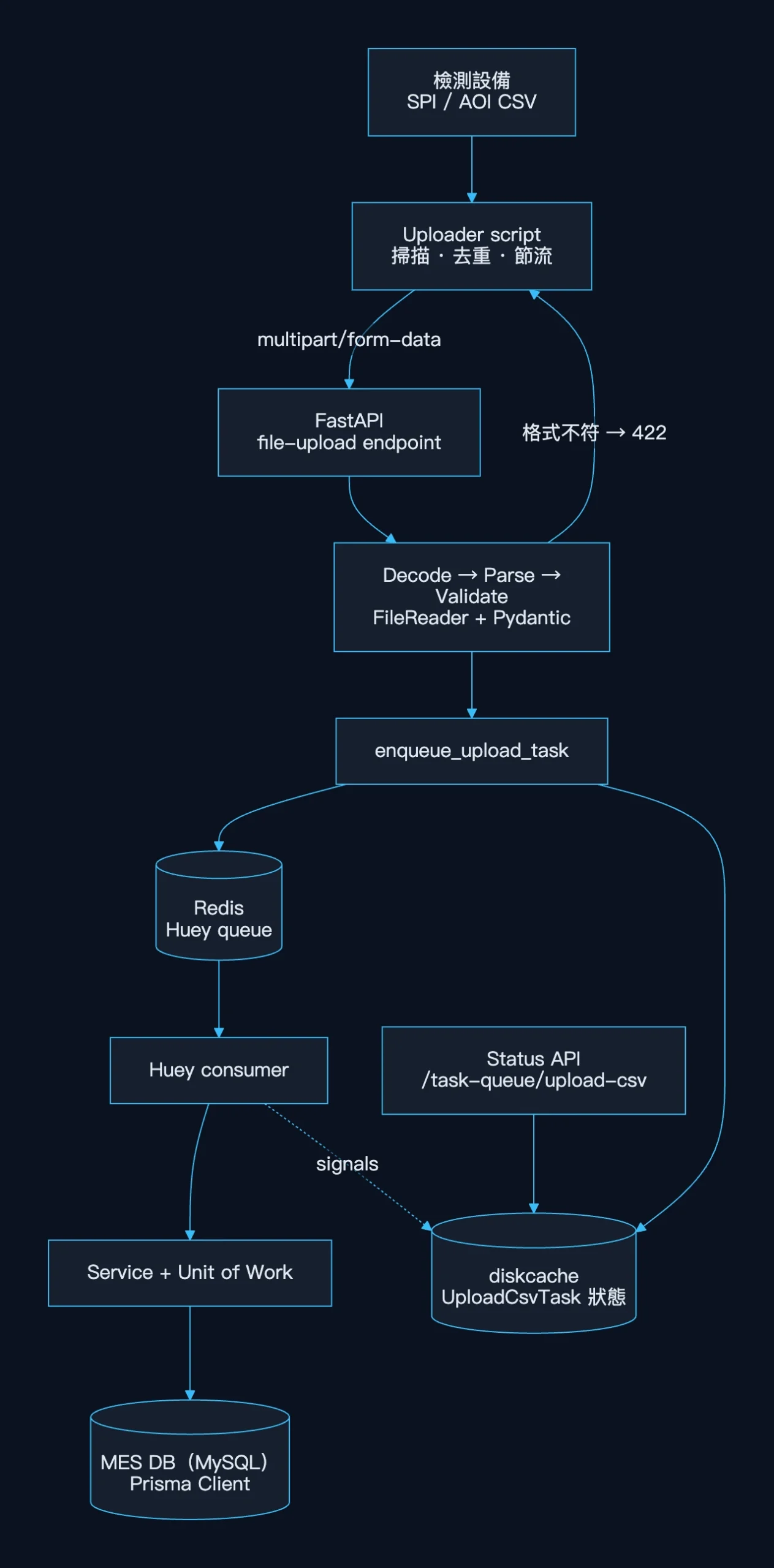
資料的生命週期:
- Uploader 送出原始檔案(bytes)
- API 依設備編碼 decode,解析檔名與三個區塊,組成 Pydantic model——檔案不合法就在這裡直接回 422
- 驗證過的 model 被放進 Redis queue,同時在 diskcache 建立一筆
PENDING的 task 狀態 - API 回傳
task_id,request 結束 - Worker 取出 task,開 transaction 寫入主檔、條碼、明細
- Huey signal 把狀態更新成
STARTED→SUCCESS/FAILURE(重試中會回到PENDING) - 使用者或 script 用
task_id查詢處理結果
6. Upload Endpoint:接收成功 ≠ 處理完成
@router.post("/SPI_Test/file-upload", status_code=status.HTTP_201_CREATED)
async def upload_spi_test_file(
    file: UploadFile = File(...),
    spi_service: SpiTestService = Depends(create_spi_test_service),
):
    file_name = spi_service.split_file_name_and_check_ext(file.filename)  # 非 .csv → 422

    # 同步:decode + parse + validate,錯誤在這裡就回給 client
    spi_test_model, item_models = spi_service.process_upload_and_validate(file_name, file.file)
    spi_test_model.items = item_models

    # 非同步:寫入 DB 交給 worker
    task = enqueue_upload_task(upload_spi_data, file_name, spi_test_model, "SPI")

    return {"status": "queued", "filename": file_name, "task_id": task.id}
這個 endpoint 的責任邊界很明確:
- 同步做的事:副檔名檢查、解碼、parsing、schema 驗證。這些是「這份檔案本身有沒有問題」,應該立刻讓上傳端知道,而不是排進佇列才失敗。
- 非同步做的事:資料庫寫入。這是「系統有沒有辦法把它存好」,可能受資料庫狀態、連線、鎖影響,適合交給有重試機制的 worker。
API 接收成功,不等於資料處理完成。
回應裡的 "status": "queued" 與 task_id,就是在 API contract 上明確表達「我收到了,而且格式正確,但還沒寫完」。
老實說,這裡的 HTTP status code 還是 201 Created,語意上 202 Accepted 更準確——同一個專案裡另一個背景匯出任務的 endpoint 就是用 202。這是之後應該統一的地方。
7. Background Worker:Huey + Redis
選 Huey 不是憑空決定的。專案裡早就有一個用 Huey(SQLite backend)做的背景任務:把大量條碼的檢測資料打包成 zip 供下載,當時也留有一本 Huey 的實驗 notebook。CSV 上傳沿用同一套工具,但換成 RedisHuey,用獨立的 queue name 和舊任務隔開。
7.1 Enqueue 與狀態追蹤
upload_huey = RedisHuey("upload_tasks", host=REDIS_HOST, port=6379)
upload_task_cache = Cache(directory="./cache/upload-task-queue/")

def enqueue_upload_task(task_wrapper, file_name: str, data_model, task_name: str) -> UploadCsvTask:
    result = task_wrapper(file_name, data_model)          # 放進 Redis,拿回 task id
    task = UploadCsvTask(
        id=result.id,
        task_name=task_name,
        file_name=file_name,
        detail_count=len(getattr(data_model, "items", []) or []),
        barcode_count=_count_barcodes(getattr(data_model, "barcodes", None)),
    )
    upload_task_cache.set(result.id, task, expire=_get_upload_task_expire())
    return task
Huey 的 result 被讀取後就會從 queue 移除,因此 task 狀態另外存在 diskcache,並設定保留期限(開發環境 10 分鐘、其他環境 10 天),讓使用者事後仍能查詢。
7.2 Worker 端:同步 worker 呼叫 async service
Service 與 repository 都是 async(Prisma Client Python 的 asyncio interface),但 Huey consumer 執行的是一般同步函式,所以 task 內部要自己驅動 event loop:
loop = asyncio.new_event_loop()
asyncio.set_event_loop(loop)

@upload_huey.task(retries=3, retry_delay=10)
def upload_spi_data(file_name: str, spi_test_model):
    spi_service = create_spi_test_service()

    async def run_task():
        await spi_service.add_spi_test_data(file_name, spi_test_model)

    return loop.run_until_complete(run_task())
這段有一個真實的演進故事。第一版的 task 長這樣:
@upload_huey.task()
def upload_spi_data(file_name, spi_test_model):
    spi_service = create_spi_test_service()
    spi_service.add_spi_test_data(file_name, spi_test_model)   # async 函式,沒有 await
呼叫 async 函式卻沒有 await,只會產生一個 coroutine 物件,寫入根本不會發生。同一版的 endpoint 還同時保留了同步寫入,所以功能看起來是正常的——資料其實是 request 裡那次寫進去的。幾天後我把同步寫入註解掉、改成上面的 event loop wrapper,並加上 retries=3, retry_delay=10。這是一個很典型的教訓:背景任務必須能被單獨驗證,不能讓同步路徑掩蓋它有沒有真的執行。
7.3 用 Signal 維護狀態機
@upload_huey.signal()
def handle_upload_task_signal(signal: str, task, exc: Exception | None = None):
    upload_task = upload_task_cache.get(task.id)
    if not upload_task:
        logger.error({"message": "Upload task ID not found in cache DB", "task_id": task.id})
        return

    if signal == signals.SIGNAL_EXECUTING:
        upload_task.state, upload_task.started_at = "STARTED", datetime.now()
    elif signal == signals.SIGNAL_COMPLETE:
        upload_task.state, upload_task.finished_at = "SUCCESS", datetime.now()
        upload_task.exception = None
    elif signal == signals.SIGNAL_ERROR:
        upload_task.state, upload_task.finished_at = "FAILURE", datetime.now()
        upload_task.exception = repr(exc) if exc else None
    elif signal == getattr(signals, "SIGNAL_RETRYING", None):
        upload_task.state = "PENDING"
        upload_task.exception = repr(exc) if exc else upload_task.exception

upload_task_cache.set(task.id, upload_task, expire=_get_upload_task_expire())對外提供兩個查詢端點:GET /task-queue/upload-csv/{task_id} 查單筆,GET /task-queue/upload-csv/list 可依 state、task_name、file_name 過濾。狀態裡還帶了 detail_count 和 barcode_count,出問題時可以先判斷是不是「大檔」。
8. CSV Parsing Pipeline
Server 端的 parsing 分成三層:FileReader(infrastructure) 負責讀格式、Service 負責 mapping 與組裝、Pydantic model 負責型別與驗證。
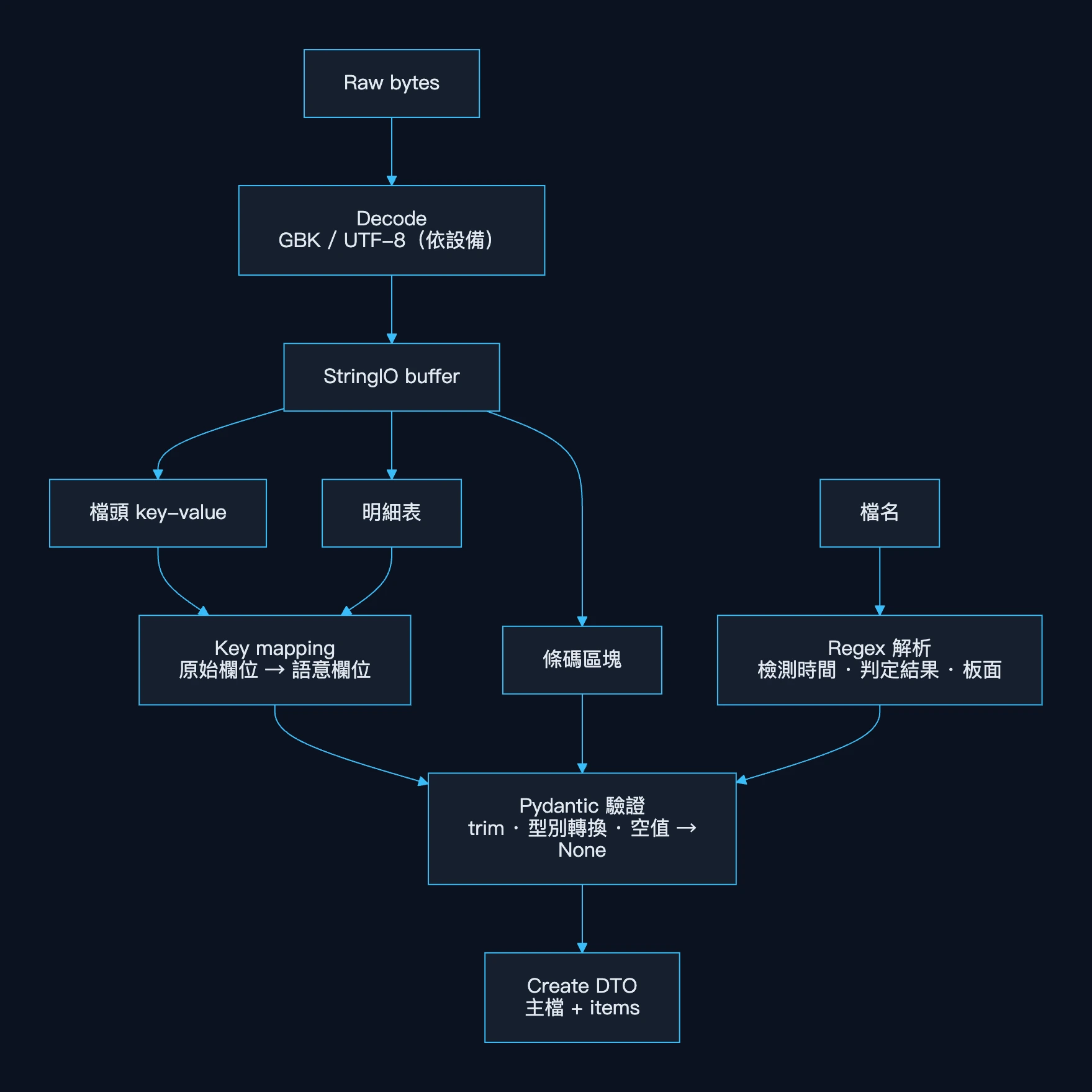
def process_upload(self, filename: str, file: BinaryIO):
    test_date_time, check_result = self.file_reader.parse_filename(filename)
    content = file.read().decode("gbk")          # 這台設備固定輸出 GBK
    csv_buffer = StringIO(content)

    spi_test = self.file_reader.read_spi_test(csv_buffer)
    csv_buffer.seek(0)
    spi_test_items = self.file_reader.read_spi_test_item(csv_buffer)
    csv_buffer.seek(0)
    barcodes = self.file_reader.read_spi_barcode(csv_buffer)

    return spi_test, spi_test_items, barcodes, test_date_time, check_result

def map_dict_to_model(self, raw: dict, mapping: dict) -> dict:
    result = {}
    for k, v in raw.items():
        if k in mapping:
            result[mapping[k]] = None if isinstance(v, str) and v.strip() == "" else v
    return result
幾個設計點:
- 同一個 buffer 讀三次:上傳進來的是
SpooledTemporaryFile,先整份 decode 成字串放進StringIO,每個區塊讀完seek(0)再讀下一個,避免依賴底層檔案物件的狀態。 - mapping table 是資料,不是程式邏輯:設備改欄位名時只需要改 dict。
- 不同設備、不同 reader:SPI 的「檔頭+條碼+明細」、AOI 的「寬表(60+ 欄)+固定欄位位置的條碼」各自有 FileReader,但都輸出相同形狀的
(主檔 dict, 明細 list),讓 Service 與 Repository 不需要知道格式差異。 - 板面(Top / Bottom)不在資料裡:SPI 從程式名稱結尾推得,AOI 從檔名的料號段推得,這些規則都是在 notebook 裡先驗證過的。
9. Database Persistence
資料庫存取使用 Prisma Client Python(asyncio)連到 MES 的 MySQL,外面包一層 Unit of Work,把 Prisma 的 tx() 包成 async context manager:
class SpiTestUnitOfWork:
    def __init__(self):
        self.tx_manager = mes_db.tx()
        self.spi_test_repo: SpiTestRepository | None = None

    async def __aenter__(self):
        if not mes_db.is_connected():
            await mes_db.connect()
        tx = await self.tx_manager.__aenter__()
        self.spi_test_repo = SpiTestRepository(tx)
        return self

    async def __aexit__(self, exc_type, exc_val, exc_tb):
        await self.tx_manager.__aexit__(exc_type, exc_val, exc_tb)
寫入流程與重複處理:
async def add_spi_test_data(self, filename: str, data: SpiTestCreate):
    try:
        spi_data, barcodes, mount_blocks, items = await self._split_data(data)

        async with SpiTestUnitOfWork() as uow:                 # tx 1:主檔 + 條碼
            spi_test = await uow.spi_test_repo.add_one_test(spi_data)
            await uow.spi_test_repo.add_barcodes(spi_test.id, barcodes, mount_blocks)

        for batch in self._batch(items, self.BATCH_SIZE):       # tx 2..N:明細,每批 10 筆
            async with SpiTestUnitOfWork() as uow:
                await uow.spi_test_repo.add_items(spi_test.id, [i.model_dump() for i in batch])
        return spi_test

    except EntityAlreadyExistError:                             # 同一份檔案再次進來
        spi_test = await self.query_repo.find_test_by_file_name(filename)
        async with SpiTestUnitOfWork() as uow:
            await uow.spi_test_repo.remove_barcodes(spi_test.id)
            await uow.spi_test_repo.remove_items(spi_test.id)
            await uow.spi_test_repo.add_barcodes(spi_test.id, barcodes, mount_blocks)
        for batch in self._batch(items, self.BATCH_SIZE):
            async with SpiTestUnitOfWork() as uow:
                await uow.spi_test_repo.add_items(spi_test.id, [i.model_dump() for i in batch])
        return spi_test
Repository 把資料庫例外翻譯成 domain exception:
async def add_one_test(self, data: dict):
    try:
        return await self.spi_test.create(data)
    except UniqueViolationError:
        raise EntityAlreadyExistError(message=f"The test of file [{data['file_name']}] is already existed")
這裡最重要的設計是 file_name 上的 unique constraint。它讓「同一份檔案」成為資料庫層級可辨識的 identity,因此:
- Uploader 可以用
file-namesAPI 做上傳前去重 - 重複上傳或 worker 重試時,主檔不會重複建立,而是走「刪除舊明細 → 重新寫入」的替換路徑
- 搭配 Huey 的
retries=3,一個寫到一半失敗的 task 在重試時會收斂到完整狀態,而不是留下兩份資料
也要誠實說明目前的取捨:
- 不是單一 transaction:主檔與每一批明細是分開的 transaction。好處是單一 transaction 不會過大;代價是失敗時資料庫會短暫存在「不完整」的中間狀態,依賴重試來修復。
- 明細是逐筆寫入:repository 裡保留了被註解掉的
create_many版本,目前實際執行的是在 transaction 內迴圈逐筆寫入。 - 替換路徑只換明細:重送同名檔案時,條碼與明細會被替換,但主檔欄位不會更新。如果設備重新輸出同名但內容不同的檔案,主檔會停留在舊值。
10. Failure Handling:Data Pipeline 不只是 Happy Path
這個專案目前沒有針對 CSV pipeline 的自動化測試(tests/ 裡的測試涵蓋的是其他模組)。能證明這條 pipeline 如何處理失敗的,是 notebook 的實驗輸出、Client 端 log,以及程式碼本身。以下依失敗發生的位置整理:
| 失敗情境 | 目前行為 | 依據 |
|---|---|---|
副檔名不是 .csv | 同步回 422(UnSupportedExtError),不進 queue | Service 程式碼 |
| 欄位缺漏、型別錯誤 | Pydantic 驗證失敗,request 內就失敗 | Model 程式碼、Client log 中的 422 |
| 檔名不符合 regex | parse_filename 回傳 None,解包時拋出非 domain 的例外 | 程式碼推論 |
| 條碼區塊格式異常 | 被 except 吞掉,回傳 None,資料照樣寫入但沒有條碼 | FileReader 程式碼、notebook 輸出 |
| 寫入明細途中 DB 失敗 | Huey 重試最多 3 次,每次間隔 10 秒;重試時走替換路徑 | retries=3、EntityAlreadyExistError 分支 |
| 重試用盡 | task 狀態變成 FAILURE,exception 欄位保留 repr(exc) | signal handler |
| 同一份檔案重複上傳 | 上傳端先去重;即使送到,也只替換明細 | file_name @unique、file-names API |
從這張表可以看出一個刻意的切分:格式問題在 request 內 fail fast,基礎設施問題交給 worker 重試。
同時也有幾個我認為目前版本仍存在的限制:
- 原始檔案沒有保留:Server 讀完
UploadFile就丟掉,queue 裡放的是解析後的 Pydantic model(由 Huey 序列化存入 Redis)。這表示無法在修正 parser 後重新處理舊檔,除錯時也看不到原始輸入。 - Worker 當機時的行為取決於 Huey:還在 Redis 裡排隊的 task 會保留;但根據 Huey 的設計,task 在執行前就會從 queue 取出,執行到一半時 consumer 被砍掉的那一筆,不保證會被重新執行。
- 狀態存在本機的 diskcache:API 與 worker 必須共用同一個檔案系統才看得到同一份狀態,這限制了兩者的部署方式。另外
enqueue_upload_task是先 enqueue 再寫入狀態,根據程式碼推測,worker 動作夠快時可能先收到EXECUTINGsignal 而找不到狀態紀錄(handler 會記一筆 error log 後略過)。 - 靜默的型別轉換:數值轉換失敗時預設回傳
0/0.0,而不是拒絕該筆資料。對檢測資料而言,「0」和「缺值」意義不同,這是一個資料完整性風險。
11. Before vs After
| Local Parsing(Client 解析) | Server-side Pipeline(目前版本) | |
|---|---|---|
| Client 責任 | 解析、驗證、組 JSON、分批上傳、維護 schema 副本、處理部分失敗 | 掃描資料夾、去重、節流、上傳原始檔案 |
| Payload | 解析後的 JSON;SPI 需拆成主檔+多批明細 request | 單一 multipart 檔案 |
| 一份檔案的寫入 | 跨多個 HTTP request,任一失敗就留下半筆資料 | Server 內部處理;主檔與明細分批 transaction,由重試收斂 |
| Retry | 由 script 自行判斷 | Huey retries=3, retry_delay=10,搭配 unique file_name 的替換路徑 |
| Failure isolation | 錯誤散落在各台產線電腦的 log | 格式錯誤同步回 422;寫入錯誤留在 task 狀態與 Server log |
| Parsing consistency | Client 與 Server 各有一份 model,曾出現 schema 漂移 | parsing rule 與 schema 只存在 Server |
| 可觀測性 | 只有 Client 本機 log | task_id 查詢、狀態、detail_count、例外字串 |
| Request lifecycle | 等待所有明細寫完才結束 | 解析驗證完即回應,不必等待資料庫寫入 |
| 擴展方式 | 每個新站別要寫新 script 並部署到產線電腦 | 新增 FileReader + Service + task,uploader 幾乎可重用 |
12. 如果重新設計一次(Future Improvement)
以下都是尚未實作的改進方向,依我認為的優先順序排列:
- 先保存原始檔,再處理(Future Improvement):上傳後先寫入 staging 目錄或 object storage,job 只帶檔案路徑與 hash。這能換來 reprocessing、audit、除錯與較小的 queue payload,也讓 parsing 可以選擇性移到 worker。
- 以內容 hash 作為 idempotency key(Future Improvement):目前 identity 是檔名。加入 content hash 後,可以區分「同一份檔案重送」與「同名但內容不同」,並正確更新主檔。
- 一份檔案一個 transaction,或 staging table 切換(Future Improvement):用
create_many在單一 transaction 寫入,或先寫 staging 再原子切換,讓資料庫不再出現中間狀態。 - 把 task 狀態搬進資料庫(Future Improvement):以
PENDING / STARTED / SUCCESS / FAILURE / DEAD的 state machine 存在 DB,解除 API 與 worker 必須共用檔案系統的限制,並消除 enqueue 與狀態寫入的競態。 - Dead Letter Queue 與通知(Future Improvement):重試用盡的 task 進入 DLQ,搭配專案既有的通知機制告警。
- OpenTelemetry 延伸到 worker(Future Improvement):FastAPI 端已經有 OTel instrumentation,下一步是讓 trace context 跟著 task 走,串起「上傳 → 排隊 → 寫入」的完整 span。
- Parser contract tests(Future Improvement):把 notebook 裡用過的樣本檔(去識別化後)變成 fixture,對每台設備的 FileReader 寫 golden test,涵蓋編碼、重複欄位、空值、缺條碼、錯誤檔名。
- API 語意與 schema versioning(Future Improvement):佇列型 endpoint 統一回
202 Accepted並附上狀態查詢位置;在 model 中記錄設備格式版本,讓格式變更可追溯。
13. 結論
一開始,我把這個需求理解成 CSV parsing:搞懂格式、寫好 pandas、把資料塞進資料庫。
做到後來才發現,真正需要設計的是:如何讓一批數量不固定、可能失敗、處理時間不固定的資料工作,在 Web Request 之外被可靠地完成,並且讓每一份檔案的結果都可以被追蹤。
這條 pipeline 的演進,本質上是在移動責任邊界:
- 把 parsing rule 與 schema 從產線電腦收回 Server,讓資料語意只有一個擁有者
- 把「格式是否正確」留在 request 內 fail fast,把「能否寫入成功」交給有重試的 worker
- 用資料庫的 unique constraint 定義檔案的 identity,讓重送與重試可以收斂
- 用
task_id與狀態機,讓「收到了」和「做完了」在 API contract 上成為兩件不同的事
它還不是終點——原始檔保留、單一 transaction、持久化的狀態機都還沒做。但從 notebook 到現在的 Upload → Parse & Validate → Queue → Persist → Status,這是這個專案裡我認為最重要的一次 architecture evolution。
Tech Stack
Python · FastAPI · pandas · Pydantic · Huey · Redis · diskcache · Prisma Client Python · MySQL · httpx · Jupyter Notebook · loguru